7 Considerations for Choosing the Best Digital Directory Software
A digital building directory can be a great asset to your establishment, making for an attractive, versatile and simple resource for customers and visitors to get where they need to go. You will need a digital signage software to get a digital directory and other content streaming to your screen. There are a lot of options out there, each with its own pros and cons. To help you settle on a software that will work for your needs, we’ve come up with a few considerations to keep in mind when choosing one. In this section of our digital directory how-to, we’ll address the following considerations:
- What kind of technology and know-how the software requires
- Whether you want a multifunctional screen
- If you have multiple screens or locations
- Your options for digital directory design
- How often you’ll need to update your digital directory
- How you want to control your screen
- Your budget
Here are 7 things to consider when choosing a digital directory software:
1. What kind of technology and know-how the software requires
A digital directory software will require accompanying technology and a level of technological savvy to use, which you’ll want to consider when choosing a software. Firstly, of course, you’ll need a TV or other display (which we’ll help you decide on in Chapter 2) to show your digital directory on. You’ll also need a digital media player that plugs directly into your display via an input like HDMI. Depending on which software you use, the digital signage player may or may not have to be purchased separately, or you may be able to use an existing PC or device. In many scenarios, the digital signage player receives a signal from your digital signage software over the internet, so you’ll also need a WiFi connection or a network cable run to the location of your installation. The level of know-how you’ll need to manage your digital directory system will vary depending on the software you choose. A DIY setup can require a hefty amount of configuration, while Enplug’s software comes pre-loaded on the device and is controlled from a web-based dashboard. Once installation is complete (and we’ll go over that in Chapter 3), the software is about as easy to use as Facebook or Gmail.2. Whether you want a multifunctional screen
Will your digital directory be a single static page? Or do you want to rotate in other content, like videos, ads or a live social media feed? Do you want touchscreen (or otherwise interactive) technology? Do you want your display in portrait or landscape orientation? How much content management control are you looking for? All of these factors should play a role in your decision-making when researching digital directory software options. If you only plan on having one display with one static image, you won’t need all the bells and whistles of a more advanced digital signage software. However, do consider whether you may want more flexibility as your business grows. After all, if you’re going to invest in the technology, you might as well take advantage of the many features digital signage software has to offer. Many digital signage software solutions don’t offer a wide selection of apps to integrate with your signage, though some do. With Enplug, for example, you have access to an App Market with more than a dozen apps to choose from (one of which being the Directory app).3. If you have multiple screens or locations
Large buildings with multiple entrances will likely require a display near each entrance and on every floor. And if your business has several locations, you’ll need a different directory for each location. Does your software allow you to easily manage content in all your buildings from one dashboard? Can you assign multiple users to control your content? Can you see what’s live on-screen (if you have rotating content) from your dashboard? Some software options offer this, while others are more limited and complicated.4. Your options for digital directory design
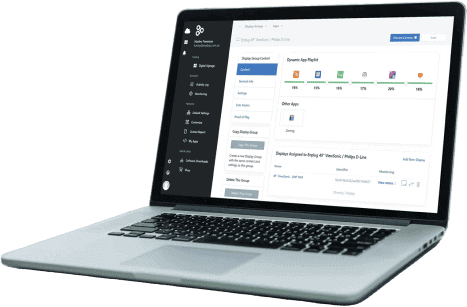
Do you want a static, straightforward directory, or do you want something that’s more eye-catching? And do you want the ability to change up the design as needed? Most digital signage software allows you to make changes to your listings easily, though some may limit you to a certain orientation or layout. Make sure you know what the design options are before you purchase—the more flexible they are, the more creative you can get. (We’ll go over digital directory design more in Chapter 5.) Changes are made using Enplug’s web dashboard, and are then transferred through the cloud to your display
5. How often you’ll need to update your digital directory
It’s likely at some point you’ll need to update your digital directory’s listings, even if only a couple times a year. Chances are you’ll need to be able to update it much more frequently than that, especially if you’re running other apps on the same display. You’ll want to be able to do that quickly and easily, and many software options that use an internet connection use the cloud to update your content as soon as you’ve made changes from the web or your desktop. Digital directory management systems should allow you to easily update your tenants’ listings by simply updating appropriate fields from your web dashboard.6. How you want to control your screen
Most digital directory software can be operated either from the web or from your desktop. Desktop software must be downloaded onto your hard drive, meaning you’ll have to use the same computer to make all changes to your directory (unless you install the software on multiple computers). Web-based software like Enplug’s is much easier to use and can be controlled from any computer or mobile device.7.Your budget
Perhaps the most important consideration for many businesses is the cost of the software. When combined with the cost of displays and the digital signage player (which, remember, is often sold separately), it can be a big investment. Many digital signage software companies don’t list their prices online—you have to call or give out your personal information to a sales rep to get a quote. (Hint: Enplug’s prices are no secret—they’re listed here.) Most digital signage companies charge monthly for their software, but not all offer software updates for free. Make sure you know this before you buy—while software updates are important, you don’t want to end up paying for every little bug fix that comes along. Keep in mind that some of the aforementioned features will cost you. While touchscreen technology is an appealing option, it’s going to cost you a lot more. Don’t pay for a feature just because it’s cool, but because it’ll really add value to your digital directory. If you’re a DIY kind of person, it’s possible to build a solution from scratch and get some great results, but the technical know-how required would be significant. (If you want to give it a try, you can get an idea of the DIY digital signage process here.) There are also FOSS (free open source software) options available on the market like Vodigi, Screenly, Xibo and Concerto. While the software may be free, you should consider the cost in terms of time and resources spent on setup and support. Unless you’ve got the right resources handy, paid software can save you time, hassle and money in the long run. Choosing a supported software and hardware platform ensures a smooth experience and prevents unforeseen costs down the line. And if you go with Enplug, you’ll have access to our 24/7 monitoring and active support. Now that you’ve considered your digital directory software options, how do you install your display? Click here to read: Installing a Digital Directory.Have any questions about Enplug’s digital directory software? Request more information!
*** Enplug digital signage software was co-founded by CEO Nanxi Liu and CTO Tina Denuit-Wojcik in 2012 to enable organizations to use customized real-time streaming content to create engaging external and internal communications.on March 4, 2015 10:41 am