Introducing Weather, News, & Pinterest Apps for Enplug Digital Signage
The Enplug App Market just got bigger. Much bigger.
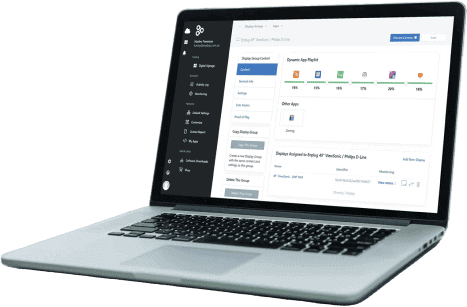
Today, we are excited to announce the release of a whole new batch of free apps in the Enplug App Market, compatible with any Enplug display. You now have even more ways to engage with your customers through Enplug’s Plug and Play device.
The new apps come in addition to the already existing live social feeds, graphics, and directory apps. Our latest release includes the Enplug Weather app, News app, and a whole bunch of new social apps.

Weather App
Dynamically inform your visitors of the most current weather conditions and forecast for your location. Forget about checking your phone for the weather, it’s conveniently displayed right on your wall. The Enplug Weather app allows you to display the current weather conditions for your area, as well as a preview of the most accurate five-day forecast available. Watch as the colors and mood of the live feed change fluidly with the temperature. The Weather app automatically updates every few minutes to ensure that the most current weather is on your display. It’s the perfect addition for any lobby or waiting room.Get it now
From your account’s dashboard, select the “Weather” tab to get started. After inputting your current location and preferred temperature scale, your display will automatically update with your location’s conditions. Help article: How to download the Weather App to your display
News App
Transform your display into your own personal hub for the latest breaking news surrounding your industry and interests. Never miss the most important stories relevant to you and your customers. The Enplug News app allows you to display a live feed of stories from all of your favorite news outlets. Just connect to any RSS feed of your choice, or choose from a preconfigured list of news sources such as the New York Times, Wall Street Journal, USA Today and more. Display a beautiful arrangement of the story’s cover image, headline, and even a brief description. Personalize the look and feel of your news feed through various customization options. The News App is perfect for office spaces, coworking spaces, waiting rooms, and schools.Get it now
To start, select the “News” tab from your account’s dashboard. From here, you can add the link to your desired RSS feed, as well as your desired title and colors. The News App will then start pulling the latest stories and display them for everyone to see. Help article: How to download the News App to your display
New Social Apps
Display a wide array of content from some of the most popular social sites and blogs across the web. Provide your audience with even more useful and entertaining information relevant to your industry and interests. We went above and beyond to provide you with a complete social experience. Display a live feed of the content you care about from your favorite social sites and blogs, including Pinterest, WordPress, Tumblr, Etsy, Blogger, Google+ and more. View the latest content from your favorite pages while the apps constantly refresh and pull the latest information to display on your screen. Our new social apps are perfect for weddings, gyms and cafes.Get it now
While under the “News” tab of your account’s dashboard, add the link to your favorite social pages and blogs. Within minutes, your Enplug display will begin showing a live feed of your favorite content. Help article: How to download the new social apps to your display Learn more about these new apps and stay up to date on what’s new at enplug.com/apps. For more information on how to setup and manage your apps visit support.enplug.com *** Enplug digital signage software was co-founded by CEO Nanxi Liu and CTO Tina Denuit-Wojcik in 2012 to enable organizations to use customized real-time streaming content to create engaging external and internal communications.on September 12, 2014 11:27 am