Digital Signage
for EDUCATION

Why Digital Signage In
Education Matters

Education at every level—from preschool and primary schools to secondary schools, universities, and private colleges—is becoming increasingly connected and technology-driven. Institutions need simple, efficient ways to communicate with students, staff, parents, and visitors. Digital signage for education provides a modern solution for sharing class schedules, campus announcements, events, important information, and engaging visual content across learning environments.

LOG INTO THE ENPLUG DASHBOARD

How Digital Signage Works

INSTALL YOUR DIGITAL DISPLAY

There are many varieties of digital displays used in education. From landscape and portrait wall-mounted displays to freestanding or fixed mobile kiosks, these displays provide an engaging way to attract attention and deliver important information, class schedules, announcements, and alerts. Paired with Enplug digital media players and our content management platform, they provide an effective digital signage solution for education, allowing you to manage your signage efficiently and scale with ease. Speak to our sales team to find out more about the range of custom display options available for schools, training colleges, and universities.

CONNECT YOUR DIGITAL MEDIA PLAYER

Your digital signage content needs a reliable device to deliver images and video to your display. Enplug uses a simple, reliable plug-and-play device that requires power and Ethernet or Wi-Fi to run the Enplug software and connect to an HD display via an HDMI cable. Need the device to operate from anywhere? We also offer 4G options for added flexibility.
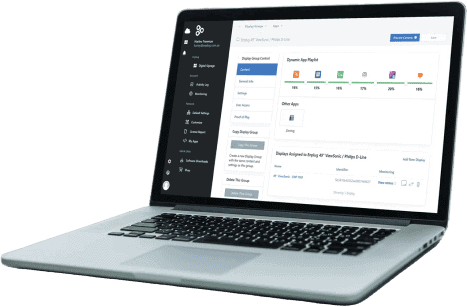
To deliver the graphics or video you’ve created to your display device, you can upload and manage your content through the Enplug Dashboard. Here’s where the true power of Enplug comes in. Manage the uploading and scheduling of digital content across individual screens and large display networks with ease. Our platform allows users to curate, manage, and monitor content remotely in real time. No more USB sticks or advanced technical IT knowledge required. We can also provide remote support should any issues arise.

CREATE AND LAUNCH YOUR DIGITAL CONTENT

Finally, you need to design the content you want to display on your digital signage, whether it is class schedules, school events, campus announcements, or other educational content. Content should be designed specifically for your display device, ensuring the format is suitable for its aspect ratio and orientation. Enplug supports a wide range of common image and video formats, including JPEG, PNG, MP4, AVI, and MOV. Built-in signage design tools with WYSIWYG functionality and templates make it easy to create your own designs. With the Enplug App Marketplace, you can also import designs from Canva or load a website, giving schools, colleges, and universities simple and flexible ways to create engaging digital signage content.

Key Benefits of Digital Signage for Education

Digital signage for schools, training colleges, and universities provides dynamic ways to communicate important information, improve student engagement, simplify wayfinding, and support day-to-day campus operations.

Update Class Schedules Instantly

Replace printed class schedules and notices with dynamic digital displays. Use the Enplug Dashboard to update timetables remotely and distribute changes across your signage network within seconds.

Improve Student & Community Engagement

Promote school events, open lectures, sporting activities, performing arts, student achievements, and other campus activities through engaging digital content. Social media apps can also help encourage students, staff, and visitors to interact with your institution online.

Improve Campus Wayfinding

Help students, staff, parents, and visitors navigate your campus with digital directories, maps, and wayfinding information. Interactive kiosks and outdoor touchscreen displays can provide useful navigation information in high-traffic areas.

Strengthen Emergency & Important Communications

Deliver important announcements, emergency messages, and time-sensitive information across your digital signage network. Content can be updated remotely, helping institutions communicate quickly across multiple buildings and locations.

Reduce Reliance on Printed Notices

Replace static posters, printed schedules, and traditional noticeboards with dynamic digital content. Schools and universities can update information remotely and keep messages relevant without repeatedly producing and distributing printed materials.

Digital Signage Features for Education

Content Creator & Templates

Create engaging announcements, class information, event promotions, campus messages, and branded content using Enplug's built-in signage design tools and templates.

Smart Scheduling

Schedule content to display at specific times and dates, making it easier to manage class schedules, events, announcements, promotions, and other time-sensitive information.

Remote Content Management

Manage individual screens or large campus display networks remotely through the Enplug Dashboard. Update information without needing to visit each screen.

Flexible Screen Layouts

Use flexible screen layouts to display different types of content on the same display. Combine announcements, schedules, promotional content, and other information where required.

Interactive Experiences

Create interactive digital signage for education using compatible touchscreen displays. Students, staff, and visitors can interact with websites, online forms, wayfinding content, and other digital experiences.

Enplug App Marketplace

Access a range of apps through the Enplug App Marketplace to add dynamic and interactive content to your school, college, or university displays.

Offline Playback

Content can continue displaying even when an internet connection is interrupted. Content stored on the device can continue playing and automatically update when connectivity is restored.

Advanced Monitoring

Monitor your digital signage network through device maps, status updates, and key device health metrics, helping administrators maintain visibility across individual displays and larger campus networks.

Digital Signage Use Cases for Schools & Universities

Reception & Welcome Areas

Create a welcoming first impression for students, parents, staff, and visitors with welcome messages, event information, campus announcements, and digital directories.

Classrooms & Learning Areas

Use digital signage for classrooms and campuses to display class information, educational content, schedules, announcements, and other relevant communications.

Hallways & Common Areas

Keep students and staff informed with school announcements, event promotions, achievements, important notices, and engaging visual content.

Campus Wayfinding & Directories

Interactive touchscreen kiosks can provide campus maps, building directories, room information, and wayfinding instructions to help students and visitors navigate larger facilities.

Cafeterias & Dining Areas

Use digital displays to communicate menu information, announcements, promotions, and other relevant content in busy cafeteria and dining environments.

Libraries & Student Areas

Promote library services, workshops, events, student activities, important announcements, and other campus information through dynamic digital displays.

Outdoor Campus Areas

Outdoor touchscreen kiosks and high-brightness displays can provide wayfinding, event information, announcements, and other important content in outdoor or high-traffic areas.

Choosing the Right Digital Signage for Your Institution

The needs of educational institutions vary depending on the size and characteristics of the facility. Enplug offers a range of digital displays for schools, colleges, and universities, providing flexible options for displaying engaging content across classrooms, reception areas, campuses, and other educational environments.

PORTRAIT WALL MOUNT DISPLAY

Portrait displays are commonly used in education for building directories, class schedules, calendars, announcements, and promotional content. Mounted vertically against the wall using a metal wall bracket, they occupy less space than horizontally mounted displays and can operate 24/7 or be scheduled during operating hours. Their high brightness also makes them suitable for well-lit educational environments.

INDOOR KIOSK TOUCHSCREEN DISPLAY

Touchscreen kiosks provide the benefits of a standard commercial portrait display with the added advantages of interaction and mobility. The touch-enabled display allows users to interact with websites and online forms, making it suitable for sign-in applications, information services, wayfinding, or custom apps using the Enplug App Marketplace. The mobile stand can also be configured with castor wheels, making it easy to move between reception areas, classrooms, and other locations.

CEILING MOUNT TV DISPLAY

Suspended from the ceiling, these display configurations are ideal for crowded and high-traffic areas where overhead visibility is required. Meeting areas, event spaces, and large cafeterias can benefit from the elevated viewpoint and can use an HDMI switch to display different content when required. Commercial-grade displays can operate 24/7 in brightly lit areas, with scheduling features configured directly from the Enplug Dashboard.

OUTDOOR TOUCHSCREEN KIOSK

Outdoor touchscreen kiosks allow students, staff, and visitors to interact with websites and online forms while accessing important information and wayfinding content. The stand can be securely fixed to a concrete base within a rugged, all-weather enclosure. The high-brightness commercial display is designed for outdoor environments and can operate throughout the year, with scheduling available to turn the display on and off as required.

VIDEO WALL MATRIX

Combining four commercial-grade displays in a daisy-chain 2x2 configuration creates a bright, high-impact digital display with strong visual impact. The configuration can be operated from a single media player delivering a 4K UHD image, making it ideal for large reception areas, auditoriums, event spaces, and other campus focal points where engaging visual content needs to make a strong impression.

How Digital Signage Enhances Education

Digital signage in schools, private training colleges, and universities provides dynamic ways to communicate important class and course information, improve student engagement, support campus navigation, and simplify internal communications. Enplug helps educational institutions deliver relevant content across individual displays and larger campus networks.

UPDATE CLASS SCHEDULES INSTANTLY

Replace printed class schedules and outdated posters with dynamic digital displays. Use the Enplug Dashboard to update class schedules remotely and distribute changes across your signage network within seconds. Content can be delivered through supported calendar apps, website content, or static JPEG, PNG, PDF, and PowerPoint files.

ELEVATE COMMUNITY & STUDENT ENGAGEMENT

Use digital signage to promote events in prominent indoor and outdoor locations, helping increase awareness of lectures, campus sporting events, performing arts, and student activities. Social media apps available through the Enplug App Marketplace can also encourage students, staff, and visitors to engage with the institution's social channels.

INTERACTIVE CAMPUS NAVIGATION AND DIRECTORIES

Interactive mobile kiosks and outdoor touchscreen displays can provide campus maps, building directories, and wayfinding instructions, helping students, staff, parents, and visitors navigate larger campuses more easily. These displays can provide useful information in prominent, high-traffic areas.

MANAGE DIGITAL NOTICEBOARDS REMOTELY

The Enplug Dashboard enables educational institutions to manage content and update digital noticeboards across classrooms, buildings, and campus locations. Keep information current and relevant while delivering important communications across your display network without needing to be onsite.

CREATE EYE-CATCHING BRANDING AND ALUMNI RECOGNITION

Replace static campus media with dynamic, vibrant displays featuring university branding, student achievements, alumni stories, photos, videos, and other institutional content. Engaging multimedia helps create a stronger sense of community while showcasing the achievements, identity, and culture of your institution.

Enplug Technology Strengths

Depending on the type of educational institution, whether primary, secondary, tertiary education, or private training, there are flexible options for displaying engaging content with Enplug’s digital signage software for schools and universities.

HIGH PERFORMANCE PLAYER

Power seamless content experiences with Enplug's NVIDIA High-Performance Device. Tested against top industry standards, our hardware offers reliability, compatibility, and 4K support, all in a sleek and compact profile.

CONNECTS TO ANY DISPLAY

Quickly connect the Enplug Device to a wide range of display types, from freestanding touchscreens and stadium jumbotrons to ceiling-mounted LED tickers, transparent LED window displays, and HD displays in portrait or landscape orientation. Our media player also works with most custom resolutions and LED displays, providing flexible options for educational environments.

WORKS ONLINE OR OFFLINE

Keep your digital signage running even if your internet connection is interrupted. Content is updated via Wi-Fi or Ethernet and stored on the device when the internet is disconnected. Once connectivity is restored, the device automatically reconnects and updates your content.

ENPLUG APP MARKETPLACE

Access a range of free, easy-to-set-up and manage apps through the Enplug App Marketplace. Enplug connects with major platforms to provide dynamic content for your displays, making it simple to add new and interactive experiences to schools, colleges, and university campuses.

ADVANCED MONITORING

Get a clear view of your digital signage network with interactive device maps, status updates, and live key metrics on device health. Enplug helps you monitor the status of your network and identify connectivity issues across individual displays and larger campus networks.

LOCAL SUPPORT

Experience technical support from local Enplug experts during normal business hours in Australian Eastern Standard Time. Support is available through the Enplug ticketing system, email, or phone, with most enquiries resolved within the hour.

Get Started With Enplug Digital Signage for Schools

Explore our digital signage package options for schools, colleges, universities, and other educational institutions, available across Australia and New Zealand.

ENPLUG PLAYER only

AUD $363 ex gst*

Device only. Delivery & installation not included.

Includes HDMI cable Includes power adapter. Plugs into any display.

24/7 Operation

QB43B COMMERCIAL 43” DISPLAY + WALL MOUNT + ENPLUG URL
PLAYER

AUD $1,183 ex gst*

Hardware only. Delivery & installation not included.

500nits
Commercial display for continuous operation.

24/7 Operation

ENPLUG PLAYER + INDOOR KIOSK
49” TOUCHSCREEN DISPLAY

AUD $3,658 ex GST*

Hardware only. Delivery & installation not included.

350nits
Commercial display for continuous operation.

24/7 Operation

ENPLUG PLAYER + OUTDOOR KIOSK 55” TOUCHSCREEN DISPLAY

AUD $16,400 EX GST*

Hardware only. Delivery & installation not included.

2500nits
High-bright display for outdoor use.

24/7 Operation

All prices on this web site are subject to change without notice.

*Excludes license fees.

Featured Education Projects

Here are just some of the well-known education centres that rely on Enplug to deliver content to their digital signage.

Type :

Education Signage

Brands :

Melbourne Indigenous Transition School

Description :

Supporting young Indigenous people as they pursue away-from-home schooling, MITS uses digital signage to display class schedules, videos giving alumni and visitors an aerial tour of the entire MITS campus, sharing photos and promoting the activities that the school participates in.

Type :

Education Signage

Brands :

Melbourne Academy of Performing Arts

Description :

After labouring for years over daily printouts of class schedules, MAPA were forced to move to a more cost-effective and simpler way of delivering important information to their members when their printer broke down. Since then they have been able to deliver stunning photos and videos of performances, promote events and maintain up-to-date schedules at the click of a button.

Our Clients’ Success Is Our Success

We have thousands of Enplug digital display devices operating interstate, nationally and internationally for a range of respected global brands.

FAQs About Digital Signage for Education

What is digital signage for education?
Digital signage for education uses digital displays to communicate announcements, class schedules, events, wayfinding information, emergency messages, student achievements, and other relevant content. Schools, colleges, and universities can manage content centrally and update individual screens or larger campus networks remotely.
School digital signage provides a highly visible communication channel for students, staff, parents, and visitors. Schools can quickly update announcements, schedules, events, and important notices without relying solely on printed posters or traditional noticeboards, helping ensure information remains current and relevant.
Yes. Compatible touchscreen kiosks and digital displays can provide campus maps, building directories, and wayfinding information. This can be particularly useful for universities and larger educational facilities where students, parents, visitors, and new staff may need assistance locating classrooms, offices, facilities, and event spaces.
Yes. Enplug allows users to manage content across individual screens and larger display networks through the Enplug Dashboard. This makes it possible for educational institutions to update and schedule content remotely across classrooms, buildings, campuses, and other locations from a central platform.
Yes. Compatible touchscreen displays can provide interactive access to websites, online forms, banking information, and other digital experiences. This can give customers another way to explore products and services while complementing the assistance provided by branch staff.